


Data Analysis and Dissemination
Understanding and sharing, to aim for operational excellence
It is often very complicated to quickly analyze data to understand a situation. The time spent consolidating data and building indicators is often a barrier to continuous improvement. Sharing information is not necessarily easier. To achieve operational excellence, these are the two pillars.
What is the Astn’go Data Analysis and Dissemination extension ?
This option does not limit the number of dashboards that each user can create. Thus, whatever the situation they have to analyze, they can create a dashboard that corresponds to their immediate needs in a few clicks. They choose the graphic representation modes (widget), the indicators, the analysis axes (reference, WO, equipment), the analysis and comparison periods. Everything can be customised : graphics, size, color, title, caption, etc. By assembling dashboards, they obtain slideshows that they can disseminate.
To facilitate meetings, they can add documents (safety guidelines for example) and note-taking areas.
To communicate in the workshop, they can add messages or guidelines.
Advantages of the Astn’go Data Analysis and Dissemination extension

The manager is totally autonomous to analyze the data

Unlimited number of dashboards and presentations

Multi-axis analysis : WO/operation, equipment, reference

Comparative analysis : periods, axes and indicators

Several dozen standard indicators

Automatic and real time update
Information sharing in the workshop, in meetings and between users
Note taking on curves, indicators and meeting dashboards
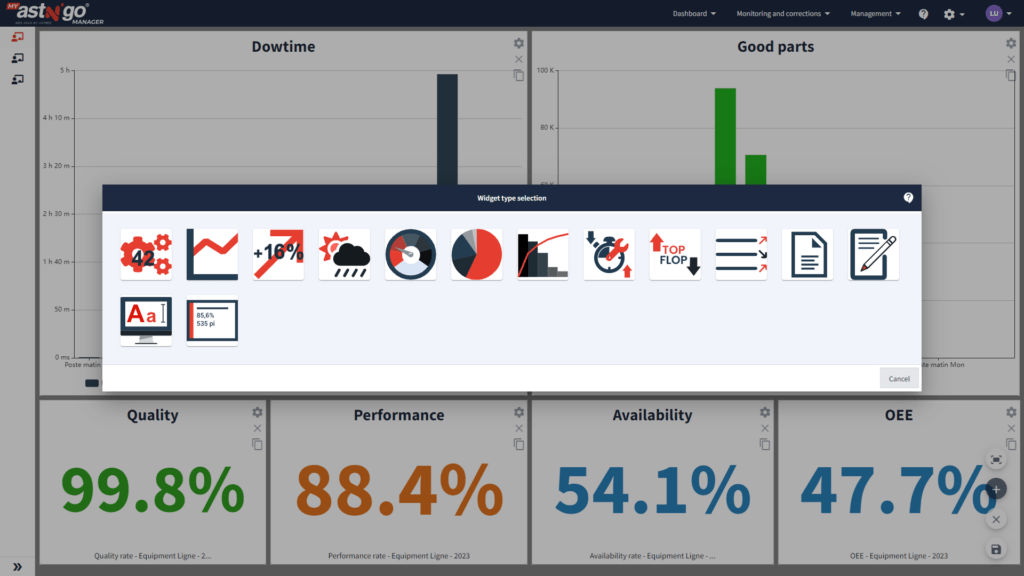
Features of the Astn’go Data Analysis and Dissemination extension
- Creation of dashboards by assembling graphic widgets
- About fifteen widget types for unlimited customization
- Share dashboards with other users
- Build presentations from the created dashboards
- Automatic dissemination of presentations on large TV screens
- Facilitation of SIM meetings with manual presentations
- Digital note taking during meetings