

How to connect the Astn’go IIoT ?

Whether you want to automatically monitor the performance and availability of your equipment and/or the quantity done, you need to connect the equipment to the Astn’go IIoT. In most cases, a single signal (“all or nothing” or “PLC output”) is enough.
The signal(s) captured can have several origins depending on what you want to measure: operating time and downtime times, parts quantities, lengths, volumes, weights.
With Astn’go, each machine can have a different way to behave.
How to connect a machine to the Astn’go IIoT?
For the collect of the signals needed for the good monitoring of my equipment, there are two types of wiring:
Dry contact (On/Off)
It is an electrical contact with no potential difference between the two terminals. The contact is controlled by the device, the most common example we can take is the case of a switch.
This type of contact is usually found when the IIoT is connected directly to a sensor or device complementary to the production machine.
Wet contact or PLC output
It constitutes a contact with a potential difference between the two terminals.
This type of contact is generally found if the signal is recovered directly from the automaton. In this case, the operating mode is as follows:
- To be in position 0: there must be a potential difference with a direct electric current between 0 and 3 volts between the two terminals.
- To be in position 1: there must be a potential difference with a direct electric current between 10 and 30 volts between the two terminals.
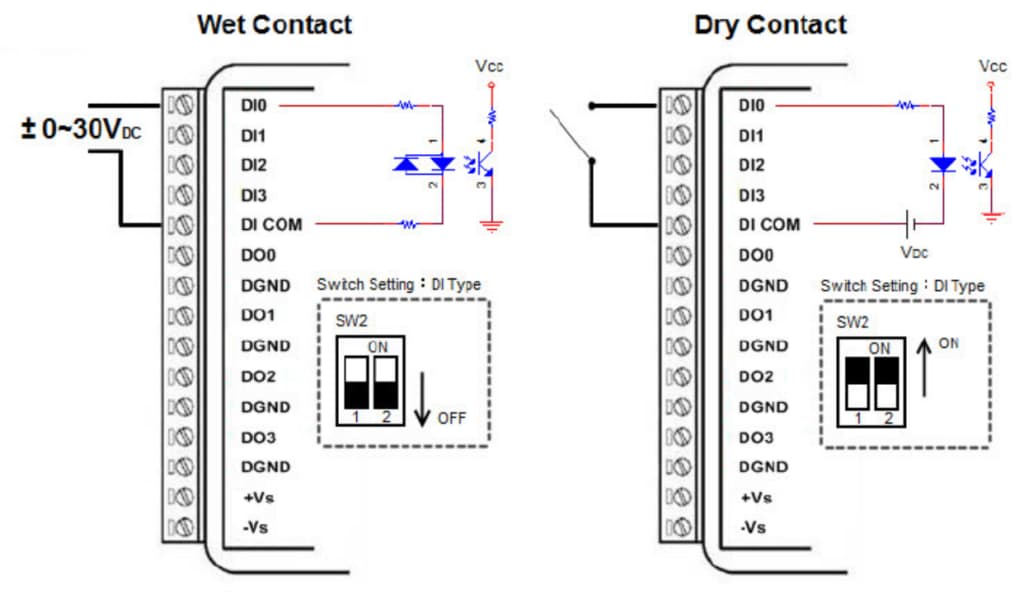
Note that the Astn’go IIoT only supports one type of connection at a time. That is, you cannot have a signal operating with a dry contact and a signal operating with a wet contact on the same IIoT. However, your fleet of IIoTs can have a heterogeneous behavior.
Example of connection to an injection molding machine
The 24v power supply is taken directly from the injection molding machine. Even if you have different brands of injection molding machines: Demag, Engel, Arburg, Billion… all have a 24v power supply integrated in the electrical enclosure.
It is possible to collect machine data using “PLC output” signals directly in 24v. At the output of the press PLC, it will be enough to configure the IIoT in PLC output mode, as below:
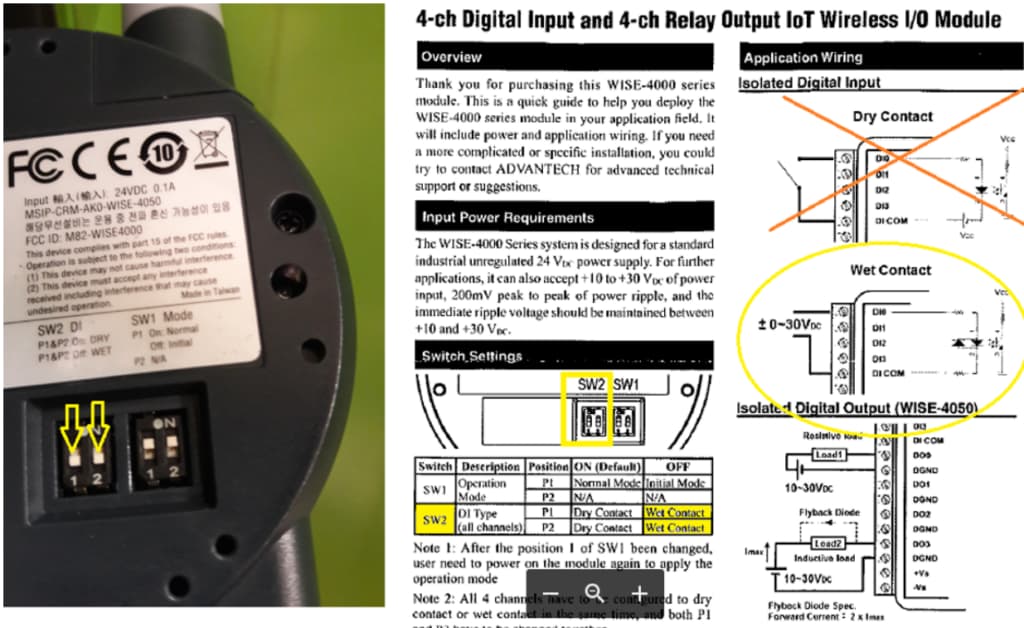
The signals that can be recovered are :
- “Open mould” information to take into account production impulses (cycle)
- Machine information in “manual” or “automatic” mode to take the impulse into account only if the machine is in automatic mode.
These signals are taken directly from the press control system or from the Euromap67 interface which is normally used to exchange data with the robots.
Where to place the Astn’go IIoT?
To optimize signal wiring, IIoTs are usually mounted in the electrical enclosure of the means of production. In the case of a WiFi IIoT, we provide a 3 meter WiFi antenna extender. This will allow you to move the antenna outside the enclosure and thus ensure good data reception.
How to connect the IIoT to Astn’go software?
To ensure the link between the IIoT and the Astn’go software, you must connect it to a network allowing access to the Internet. The IIoT and the Astn’go software will use a secure TCP WebSocket protocol on ports 80 and 443 for data exchange. And the UDP port 123 aswell.
For WiFi IIoTs, the supported WiFi standard is IEEE 802.11 b/g/n 2.4 (GHz)