

ERP or not: how can I manage my WO and operations ?

In order to monitor your production and dematerialize production documents, Astn’go allows you to manage work orders (WO).
The recovered WO’s will allow the operator to launch a WO operation on Astn’go, giving him access to key information to carry out his production (theoretical cycle time, expected quantity, set-up time, reference, other properties that you wish to disseminate to him) and above all to the manager to be able to carry out relevant analyses of the production.
With Astn’go, it is possible to customize technical data by adding properties to references (product to be manufactured, packaged, assembled, etc.) and/or operations. Thus, whatever data you use, it will be available to all in Astn’go.

With an ERP or an external system
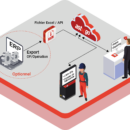
Currently, if you manage your WOs with another system (ERP, GPAO or even a simple Excel file) you can continue to do so. But to avoid re-entering them in Astn’go. To do this, we have two solutions at your disposal!
Firstly, an application programming interface (API) has been developed to allow you to automatically import your operations into Astn’go. You will find it at the following address with all the necessary documentation for its deployment: https://api-docs.astngo.com
Otherwise, Astn’go provides you with an example file (template), in .csv format, which can be downloaded and which will allow you to have the basic structure of the exchanges.
The structure of the file is not fixed, you have the possibility to add cells according to the properties you want to import in Astn’go.
Some data are mandatory such as the WO number, the operation number, the equipment to be planned or the reference. Others are optional. You can add these optional values according to the values present in your ERP (maximum speed, adjustment time, expected quantity, customer code, IIoT, BOM, tools…).
Once the structure of your import file is defined, you must map the values of your file to the Astn’go properties. A graphical interface allows you to perform this mapping and to ensure the validity of the data.
Once the mapping is done, the next step is to automate the import process or to import files manually. During an import, you have the possibility to update known operations and to create new ones: only create operations or update operations already present in Astn’go.
You are completely autonomous as soon as you have your WOs in an Excel file.
Without ERP and without external system
With Astn’go, you have all the screens for setting up your references and operations. You can customise everything by adding specific properties. Thus, you can avoid setting up an interface with your ERP to use Astn’go.